A self-service help center that answers customers 24/7
Write articles once in a Notion-style editor and publish them on your own domain. AI search and the chat agent answer from them, so fewer questions turn into tickets.
7-day free trial · No card required

- ThriveDesk integration for Slack Connect Slack with ThriveDesk to get notifications in Slack
- Inbox Overview This outlines all the basic shared inbox features available
- How to Auto-forward email from a Google Workspace Group
- Connect with WordPress and sync post, pages and customer post types
Powering support for growing teams






Self-service in numbers
A self-service help center is a library of articles where customers find answers on their own. ThriveDesk’s help center runs on your domain with your branding, has AI search and public or private docs, and Neo uses the same articles to answer questions in chat and email.
- answers without a ticket
- 24/7
- of conversations Neo resolves on its own
- 65%
- editor for public and private docs
- 1
Customers try to help themselves, then give up
Most customers look for an answer before they contact you. When the article is buried in a PDF, an old wiki or a search that needs the exact wording, they email instead, and an agent pastes a link the customer never found.
-
81% of customers try to solve a problem themselves before they contact a person. Harvard Business Review, 2017
-
14% of service issues are fully resolved through self-service. Gartner, 2019
What goes into your help center
Customers and Neo read the same content: articles you write, pages you already publish and answers your team has given before.
-
Articles and categories
Write in a Notion-style editor with toggles and numbered steps, and nest categories in sub-folders.
-
Images, video and files
The media manager keeps screenshots and walkthrough videos in one library you can embed anywhere.
-
Articles from your old help desk
We migrate your knowledge base from Intercom, Zendesk, Help Scout and others, so you don’t start from zero.
-
Your website pages
Point Neo at your pricing, policy and product pages, and it answers from what you already publish.
-
Question and answer pairs
Write short answers by hand for the rules and exceptions that don’t need a full article.
-
Past conversations
Neo learns from how your team has answered before, so its replies sound like yours.
Three ways support teams use a self-service help center
The same library of articles does different jobs as your product and customer base grow.
-
Answering how-to questions
- Before
- A customer emails, an agent finds the article and pastes the link.
- With ThriveDesk
- The customer searches or asks Neo and gets the article straight away.
-
Launching a feature
- Before
- Tickets spike the week it ships while the docs catch up.
- With ThriveDesk
- The guide goes live with the launch, and Neo answers from it within seconds.
-
Onboarding new customers
- Before
- Every new account asks the same setup questions.
- With ThriveDesk
- Getting-started articles sit inside your app through the embeddable widget.
On your domain, in your branding
The help center looks like part of your product, and you decide who reads what.
-
Your own domain
Host the help center on a domain or sub-folder you choose.
-
Your branding
Match your logo, colors and layout.
-
Public and private docs
Publish each doc for customers or keep it for your team.
-
Search engines and AI answers
Articles are set up to rank in Google and to be quoted in AI-generated answers.
-
Version history
Autosave keeps every draft, and you can roll back any article.
-
Dark mode
The help center follows each reader’s system setting.
Two places customers find your answers
Publish an article once and it shows up in your help center and inside your product.
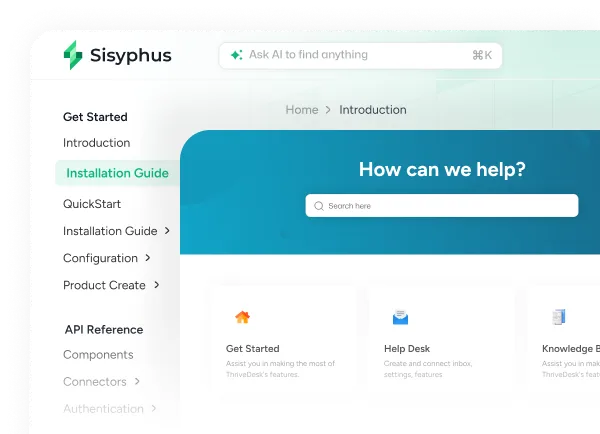
Help center
A public knowledge base with your own branding, domain and design.
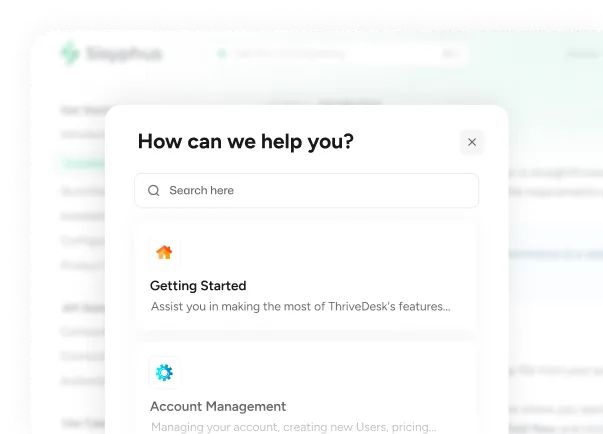
Embeddable widget
Serve your help articles inside your app, where customers get stuck.
The cost of answering what the docs already say
A worked example with round numbers. Swap in your own.
If the help center and Neo answer half of those questions, your team gets 15 hours a month back for the tickets that need a person.
- Tickets a month
- 1,000
- Share that are how-to questions
- 30%
- Minutes an agent spends on each
- 6
- Agent hours a month
- 30
- Cost at $25 an hour
- $750/mo
What changes after you launch
Most of the difference shows up in the queue.
- Fewer how-to tickets, because customers find the article in search, in the widget or through Neo.
- Agents link one article instead of rewriting the same answer.
- An updated article changes Neo’s answers too, with nothing to retrain.
- New customers get through setup with the getting-started docs inside your app.
- Your team spends the time on the tickets that need a person.
Launch your help center in five steps
Start with the 10 to 20 questions your team answers every week.
- 01
Pick your top questions
Look through the inbox for the questions that come up every week.
- 02
Write or migrate the articles
Write them in the editor, or let us move your articles from your current help desk.
- 03
Brand it and add your domain
Set your logo and colors, and point your domain or sub-folder at the help center.
- 04
Add the widget and turn on Neo
Embed the widget in your app and site. Neo starts answering from your articles.
- 05
Keep articles current
When a ticket shows a gap, update the article. Neo uses the new version within seconds.
What changes with ThriveDesk
| When | Without ThriveDesk | With ThriveDesk |
|---|---|---|
| How-to question | Emails support | Finds the article or asks Neo |
| Question worded differently from the article | Search finds nothing, so they email | AI search finds the right article |
| Feature launch week | Tickets spike while the docs catch up | The guide goes live with the feature |
| An article goes out of date | Edited in three places | Updated once, used in chat too |
| Question at 2am | Waits until morning | Answered right away |
| Internal-only process | A shared doc or wiki | A private doc in the same help center |
| Moving from another help desk | Copy and paste every article | We migrate your articles for you |

“ ThriveDesk is really easy to use while being super effective. I can say without a doubt that ThriveDesk is the best live chat software for small businesses. ”


“ The ThriveDesk team truly exceeded expectations with their exceptional work on integrating SureCart. Their dedication resulted in a powerful integration that surpassed all our requirements. ”


“ As our business and list of clients grew, user classification data became vital for us. We needed to serve our premium customers first to keep our business running. ”


“ At some point, we were paying top dollar yet not all our support requirements were being met. After some digging, we found ThriveDesk. ”

“ I love ThriveDesk so much. It’s easy to use and user friendly — the best choice for anyone who wants to modernize a classic support system and get live chat built in. ”

“ The performance of ThriveDesk is very good, and it’s intuitive. I just tried the AI chatbot — add a few knowledge base articles and it’s answering mostly correctly. ”
When this isn’t the right fit
- Your product is simple enough that customers rarely need help.
- You don’t have time to write the first 10 to 20 articles. Start there.
- Most questions are about a customer’s own account and need a person to look.
What is a self-service help center?
Can I use my own domain and branding?
How does the AI search work?
Will my help articles rank on Google?
Can I embed the help center inside my app?
Can I make some docs private?
Does Neo use the help center?
How do I move my help center from another platform?
Your answers are already written down. Put them where customers look.
Start with your top 10 questions, publish them on your own domain and let Neo answer from them.