An internal knowledge base next to the inbox
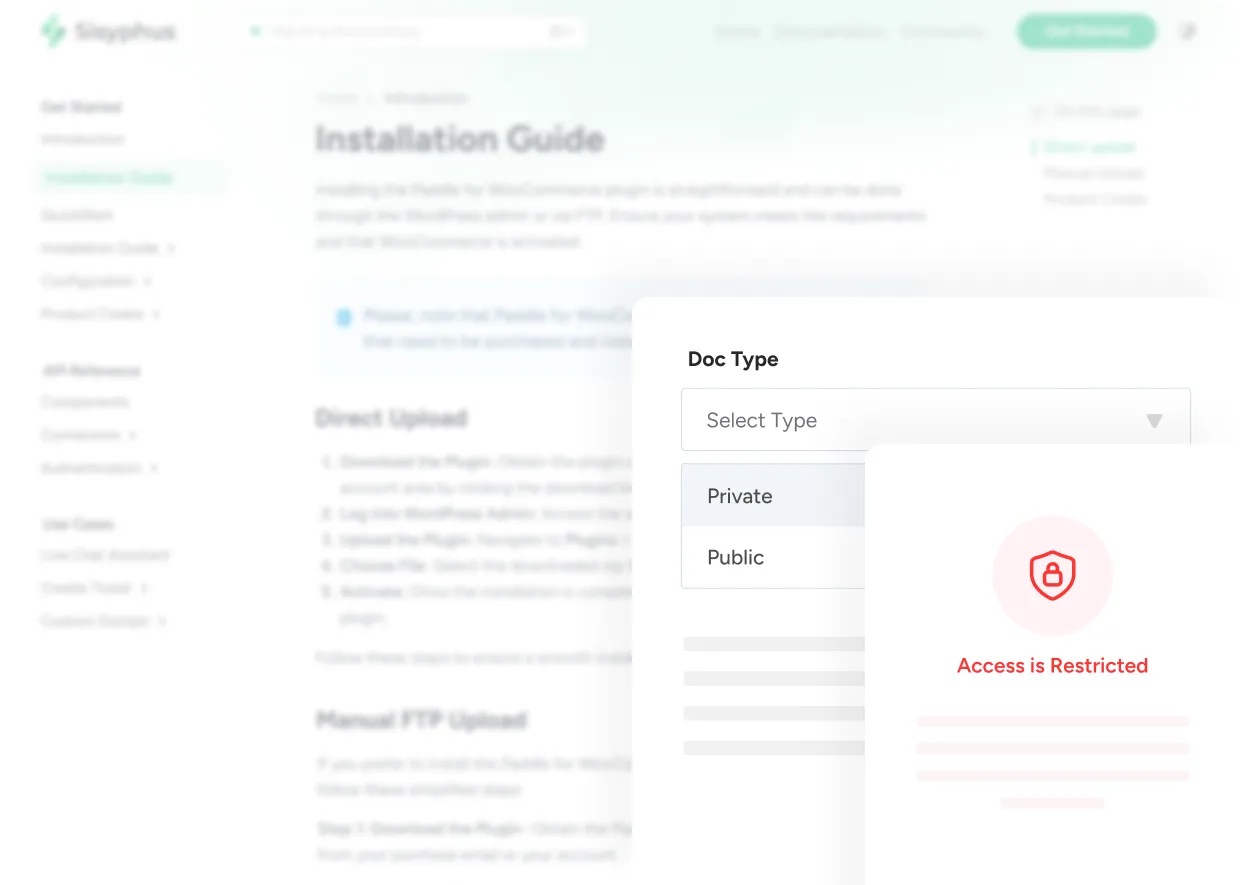
Write down how your team handles refunds, escalations and edge cases in private docs, in the same place your team answers customers. Every agent follows the same rules from their first day.
7-day free trial · No card required

Powering support for growing teams






One place for what your team knows
An internal knowledge base is where a team keeps what it knows: processes, policies, product details and answers to tricky cases. ThriveDesk lets you publish private docs from the same editor as your public help center, so support procedures live next to the inbox instead of in a separate wiki.
The answer lives in someone’s head
New agents ask the same questions, experienced ones answer from memory, and the rules drift. Notes spread across Slack threads, Google Docs and old tickets, so finding the right process takes longer than answering the customer, and every question pulls a teammate off their own queue.
-
19% of the work week goes to searching for and gathering information. McKinsey Global Institute, 2012
-
23 minutes on average to get back to a task after an interruption. UC Irvine, 2008
What goes into your internal knowledge base
Your help center docs, FAQ answers, website and past conversations sit in one place, for your team and for Neo.
Website
We crawl your public pages, so pricing, policy and product answers come from what you already publish.
Help Center
Every published article becomes an answer it can give, with a link back to the doc it came from.
FAQ
Question and answer pairs you write by hand, for the rules and exceptions that live nowhere else.
Conversations
Past tickets teach it your voice, and the edge cases your docs never got around to covering.
Three ways support teams use an internal knowledge base
Most teams start with one of these and grow the docs from there.
-
Onboarding a new agent
- Before
- Weeks of shadowing and a steady stream of quick questions in Slack.
- With ThriveDesk
- They read the internal docs and use saved replies from their first day.
-
Handling an edge case
- Before
- The answer depends on who picks up the ticket.
- With ThriveDesk
- Everyone follows the same private doc, linked in a note on the ticket.
-
When someone leaves
- Before
- What they knew leaves with them.
- With ThriveDesk
- Their know-how stays in docs and saved replies the team keeps using.
Private by default, easy to keep current
Your procedures stay with your team, and there’s one version of each.
-
Hidden from customers
Private docs never appear in your public help center or its search.
-
You choose the audience
Share a doc with your whole team or only the people who need it.
-
Shared in private notes
Link a doc on a ticket. Customers never see private notes.
-
Update once
Change a doc once and everyone sees the new version.
-
Version history
Autosave keeps every draft, and you can roll back any change.
-
The same editor
Write internal docs with the same toggles, steps and media as your public ones.
Three ways your team reaches the docs
Each one is a click from the ticket you’re working on.
The private help center
Browse and search your team’s docs, kept next to your public articles.
Private notes on the ticket
Link the right procedure where the question came up, and @mention whoever needs to see it.
Saved replies in the editor
Type / to insert the approved answer without leaving the reply.
The cost of answers that live in someone’s head
A worked example with round numbers. Swap in your own.
That’s before counting the time of the teammates who get asked.
- Support agents
- 10
- Hours each spends hunting for answers a week
- 2
- Team hours lost a week
- 20
- Cost at $25 an hour
- $500/wk
- Over a year
- $26,000
What changes after you set it up
The difference shows up in how often your team has to ask each other.
- New agents answer tickets sooner, with fewer questions to teammates.
- Refunds, exceptions and escalations get handled the same way whoever picks them up.
- A policy change reaches everyone at once, because there’s one doc to update.
- Senior agents get interrupted less and spend the time on their own queue.
- Know-how stays with the team when people leave.
Set up in an afternoon
You don’t need to set up a wiki first. Start with the questions your team asks each other most.
- 01
List the questions agents ask
Refunds, escalations, shipping exceptions: whatever comes up in Slack every week.
- 02
Write them as private docs
Use the help center editor and keep each doc private, so only your team can open it.
- 03
Save the common answers
Turn the replies your team sends most into saved replies that follow the doc.
- 04
Point to them from tickets
Link the right doc in a private note whenever a teammate asks.
- 05
Keep it current
When a rule changes, update the doc. Everyone sees the new version the next time they open it.
What changes with ThriveDesk
| When | Without ThriveDesk | With ThriveDesk |
|---|---|---|
| New agent unsure about a refund | Asks in Slack and waits | Opens the refund doc |
| A policy changes | The old version lives on in three places | Updated in one doc |
| Tricky edge case | The answer depends on who picks it up | Same procedure for everyone |
| The same question twice in a day | Answered from memory, a little differently | A saved reply that matches the doc |
| Unclear escalation path | Asks around in chat | Follows the escalation doc |
| Onboarding a new hire | Weeks of shadowing | Reads the internal docs |
| A teammate leaves | Their know-how leaves too | It stays in docs and saved replies |

“ ThriveDesk is really easy to use while being super effective. I can say without a doubt that ThriveDesk is the best live chat software for small businesses. ”


“ The ThriveDesk team truly exceeded expectations with their exceptional work on integrating SureCart. Their dedication resulted in a powerful integration that surpassed all our requirements. ”


“ As our business and list of clients grew, user classification data became vital for us. We needed to serve our premium customers first to keep our business running. ”


“ At some point, we were paying top dollar yet not all our support requirements were being met. After some digging, we found ThriveDesk. ”

“ I love ThriveDesk so much. It’s easy to use and user friendly — the best choice for anyone who wants to modernize a classic support system and get live chat built in. ”

“ The performance of ThriveDesk is very good, and it’s intuitive. I just tried the AI chatbot — add a few knowledge base articles and it’s answering mostly correctly. ”
When this isn’t the right fit
- You need a company-wide wiki for every department. This is built for support teams.
- Your team is one person who already knows everything.
- Your internal docs are mostly engineering specs.
What is an internal knowledge base?
Who can see private docs?
Is it separate from the public help center?
How is this different from private notes?
Can I share a private doc on a ticket?
How do I keep internal docs up to date?
Do I still need a separate wiki?
Put your team’s answers where the tickets are
Start with the five questions your team asks each other most, and turn each one into a private doc.