

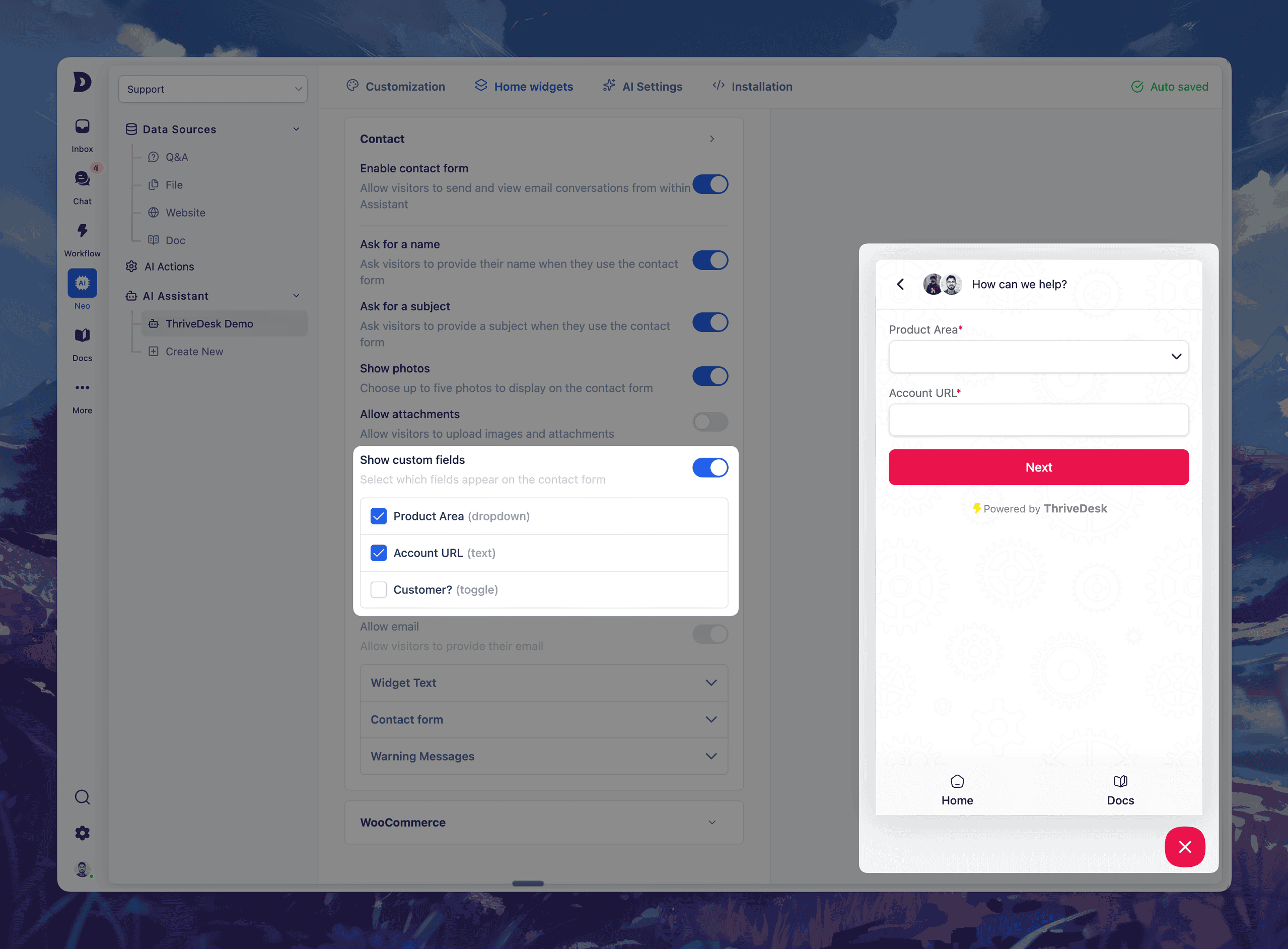
Recopila mejor información antes incluso de que empiece la conversación.
El mes pasado lanzamos Campos personalizados para entradas — brindando a tu equipo la capacidad de capturar datos estructurados directamente en cada conversación.
Hoy vamos un paso más allá.
Ahora puedes Agrega campos personalizados al formulario de contacto de tu asistente. – lo que te brinda información más detallada incluso antes de que se cree un ticket.
✨ Novedades
- Seleccione hasta 5 campos personalizados para incluir en el formulario de contacto de su asistente
- Tipos de campos admitidos: desplegable, entrada de texto y alternancia
- Sus visitantes deberán completar estos formularios antes de enviar un mensaje.
- Todas las respuestas aparecen directamente en la barra lateral del ticket.
Esto se traduce en menos idas y venidas, mejor enrutamiento y resoluciones más rápidas.
💡 Úsalo para:
- Solicita números de pedido, áreas de productos, URL de cuentas o etiquetas personalizadas.
- Asignación automática de entradas según las selecciones del menú desplegable.
- Recopila información clave incluso antes de que tu equipo responda.
La configuración es sencilla: solo diríjase a Neo → Abrir asistente → Widgets de inicio → Formulario de contacto → Campos personalizados, Activa lo que necesites y empieza a transmitir.
Mejoras y correcciones de errores
Núcleo
- Refactorización: refactorización y modernización de la arquitectura central
- Solución: Desorden en la vista de la bandeja de entrada
- Solución: La carpeta Borradores muestra los correos electrónicos enviados.
- Solución: Problema de cambio de contacto que no funciona
- Solución: problema con el enlace activo
- Solución: problema de estado de búsqueda
- Solución: error "asistente no encontrado"
- Corrección: Llamada infinita a la API de NEO
- Solución: Problema de visualización de datos EDD
- Corrección: Se solucionó el problema del borrador.
- Solución: Se ha resuelto el problema de duplicación del asistente.
- Corrección: Navegación del asistente huérfano gestionada
- Solución: Problema de guardado de la configuración de IA en el asistente
- Solución: problema de visibilidad del modal de verificación de correo electrónico
Base de Conocimientos
- Corrección: Problema de selección de categoría destacada mediante slugs separados por comas.
- Solución: Problema de inserción de enlaces de Vimeo en Edito
- Corrección: Los enlaces de la tabla de contenido se desplazan detrás del encabezado fijo en el diseño de la documentación.
- Característica: API de base de conocimientos
- Función: Guardado automático y control de versiones de artículos.
Aplicación móvil
- NUEVO: Deslizar acciones en las entradas
- NUEVO: Menciones en las notas
- Novedad: nueva página de panel de control para obtener información más detallada.
- Mejora: se ha añadido más contexto e información al botón (i) de la función de chat en directo.