

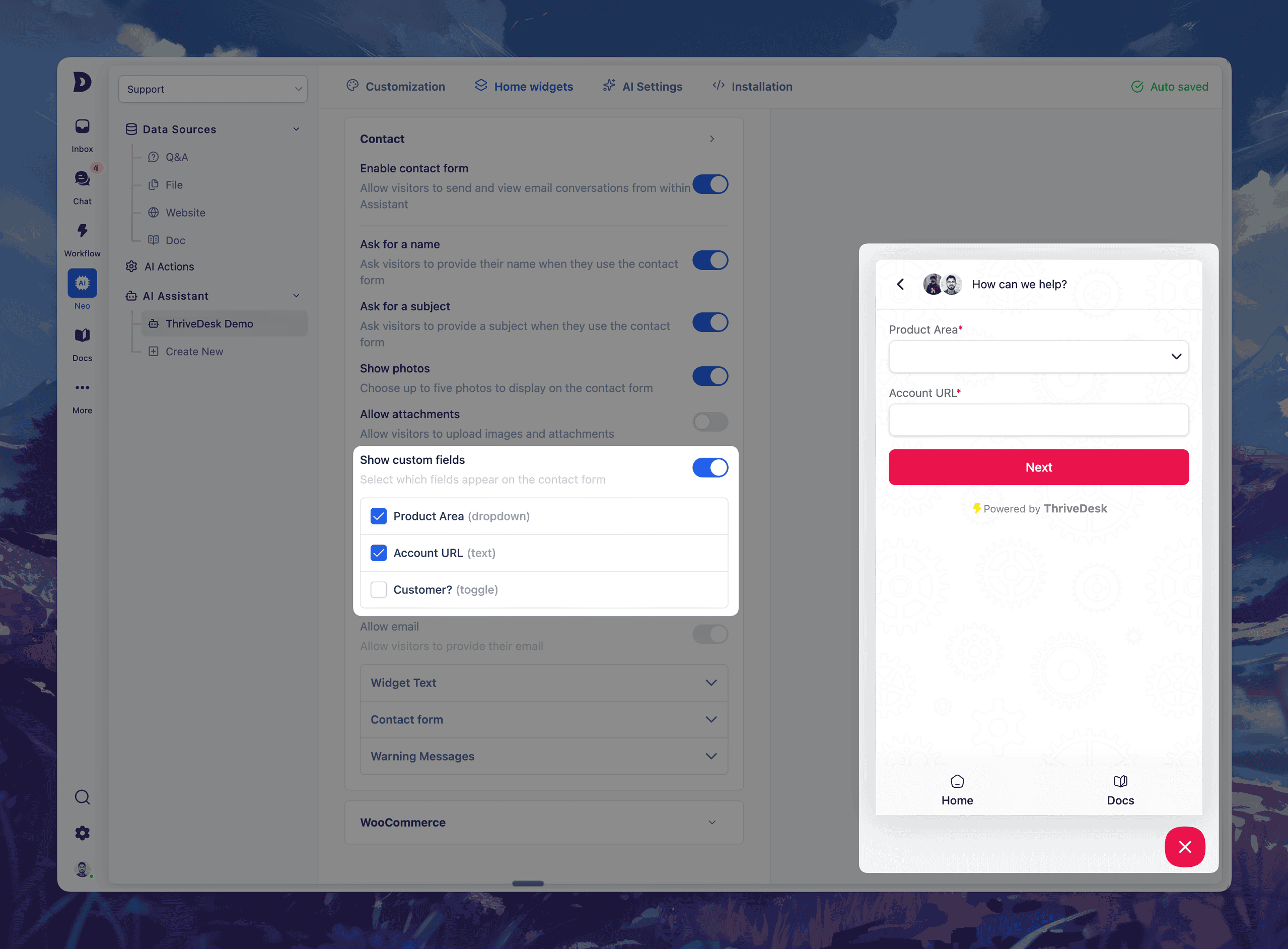
Collect better context before the conversation even begins.
Last month, we launched Custom Fields for Tickets — giving your team the power to capture structured data right inside every conversation.
Today, we’re taking that one step further.
You can now add custom fields to your Assistant’s contact form – giving you richer insights before a ticket is even created.
✨ What’s New
- Select up to 5 custom fields to include in your Assistant’s contact form
- Field types supported: dropdown, text input, and toggle
- Your visitors will fill these out before submitting a message
- All responses appear directly in the ticket sidebar
This means less back-and-forth, better routing, and faster resolutions.
💡 Use it to:
- Ask for order numbers, product areas, account URLs, or custom tags
- Auto-assign tickets based on dropdown selections
- Collect key info before your team even replies
Setup is easy — just head to Neo → Open Assistant → Home Widgets → Contact Form → Custom Fields, toggle on what you need, and go live.
Improvements & Bug Fixes
Núcleo
- Refactor: core architecture refactor & modernization
- Fix: Inbox View Clutter
- Fix: Drafts folder shows sent emails
- Fix: change contact not working issue
- Fix: active link issue
- Fix: search state issue
- Fix: assistant not found error
- Fix: NEO infinite api calling
- Fix: EDD data display issue
- Fix: Draft issue fixed
- Fix: Assistant duplication issue resolved
- Fix: Orphan assistant navigation handled
- Fix: ai settings not saving issue in assistant
- Fix: verify email modal visibility issue
Base de Conocimientos
- Fix: Featured category selection issue by comma-separated slugs
- Fix: Vimeo Link Insertion Issue in Edito
- Fix: TOC links scrolling behind sticky header in documentation layout
- Feat: KnowledgeBase API
- Feat: Article autosaving & versioning
Aplicación móvil
- NEW: Swipe Actions on Tickets
- NEW: @Mentions in Notes
- Feat: new dashboard page for better insights.
- Improvement: added more context and info to the live chat feature (i) button.