
Every AI support vendor on the planet is claiming their bot resolves 60, 70, maybe 80 percent of tickets. One even slapped a confident “80% automation rate” on their homepage, presumably printed right next to a stock photo of a person pointing at a laptop with visible excitement.
The reality? Independent data puts most deployments somewhere between 20 and 45 percent in the first few months. That gap is not a rounding error. It is the difference between a tool that transforms your support operation and one that creates a second job called “cleaning up after the AI.”
This guide is not a sales pitch. It is a straight look at what AI in customer support actually does well, where it falls apart, how to calculate whether it is worth your money, and how to know if you are even ready for it. By the end, you will have a framework to make the call yourself.
Guide to AI in Customer Support
The Marketing Claims vs. The Reality
What the Vendors Say
Here is a quick tour of what the major players are promising right now. インターホン Fin advertises a 66% average resolution rate. Tidio Lyro claims “up to 67%.” ゼンデスク puts its automation rate at 80%. フレッシュデスク Freddy pitches 60% deflection. These numbers look like data. They are not quite.
The asterisks you never see in the headlines tell the real story. Most resolution rates are measured only on queries the AI was specifically trained to handle.
Tickets that get re-opened after an “AI resolved” tag are often excluded. Customer satisfaction is frequently not part of the equation at all.
When a vendor says 80% automation, they may mean 80% of tickets were “touched” by AI at some point, which is a very different thing from 80% of customers who got their problem solved and walked away happy.
Key distinction: “Deflected by AI” is not the same as “Resolved by AI.” A deflection just means the customer gave up and closed the tab.
What Independent Data Actually Shows
Third-party tests and user reports from real deployments tell a more useful story. In the first three months of going live, most businesses see a full resolution rate somewhere between 20 and 40 percent. After six months of active optimization, that range climbs to 35 to 55 percent. Still well short of what the marketing decks promise.
Three variables move the needle more than anything else: the quality of your knowledge base, the complexity of your product, and how tech-savvy your average customer is.
A SaaS tool with deeply technical users and a thin help center will see results at the low end. A straightforward ecommerce store with a well-maintained FAQ can punch above average.
Why the Gap Exists (And It Is Not Always the Vendor Lying)
To be fair, AI vendors are not all twirling mustaches in a smoke-filled room. A lot of the gap comes from how teams actually deploy the thing. The most common culprits:
- Thin knowledge base coverage: AI can only answer questions it has been trained on. If your help docs are three articles from 2022, your AI will confidently make things up, which is somehow worse than just being slow.
- Ambiguous questions: “It is not working” has approximately 50 possible meanings. AI handles the ones with clear intent. The rest land on your agents with an extra layer of confusion attached.
- Emotional tickets: AI correctly escalates frustrated customers to a human. This counts as unresolved in the metrics, even when it is the right call.
- Underestimated setup effort: Most teams flip the switch and expect magic. The teams that see strong results are the ones that invested real time in training data, testing, and ongoing refinement.
Where AI Genuinely Shines
The High-Resolution Categories
There are specific ticket types where AI performs consistently well, and the pattern is obvious once you see it. These are the support interactions with a single clear intent, a factual answer, low emotional charge, and a well-documented solution sitting in a help center somewhere.
- Password resets and account access: 85 to 95 percent resolution. Clear problem, clear fix. This is the AI equivalent of a layup.
- Order status and tracking: 80 to 90 percent resolution. It is a data lookup. No judgment required.
- Return and refund policy questions: 70 to 85 percent resolution. Policy-based answers are exactly what AI is built for.
- Pricing and plan comparisons: 70 to 80 percent resolution. Structured, factual, no edge cases.
- Basic how-to questions: 65 to 80 percent resolution, assuming the knowledge base article actually exists and is reasonably current.
Why These Categories Work?
Every high-performing ticket type shares the same DNA: question maps cleanly to knowledge base article, which maps cleanly to answer. There is no ambiguity, no emotion, no judgment call in the middle. AI is essentially a very fast lookup tool with decent natural language comprehension. Feed it clean inputs and clean source material and it performs well.
The lesson is not “AI is good.” The lesson is “AI is good at specific things, and those things can make a real dent in your ticket volume if you identify them correctly.”
The Compounding Effect Over Time
Every interaction the AI handles adds training data. Every edge case it fumbles and an agent corrects is a lesson. Teams that actively manage their AI see roughly two to five percent improvement per month in resolution rate during the first six months.
The knowledge base flywheel: better documentation leads to better AI responses, which leads to fewer tickets, which frees up time to write better documentation. This loop is real, but it requires someone to actually spin the wheel.
How スライブデスク handles this: NEO, ThriveDesk’s AI agent, is trained directly from your built-in 知識ベース. That means when you update a help article, your AI gets smarter the same day without any manual retraining step.
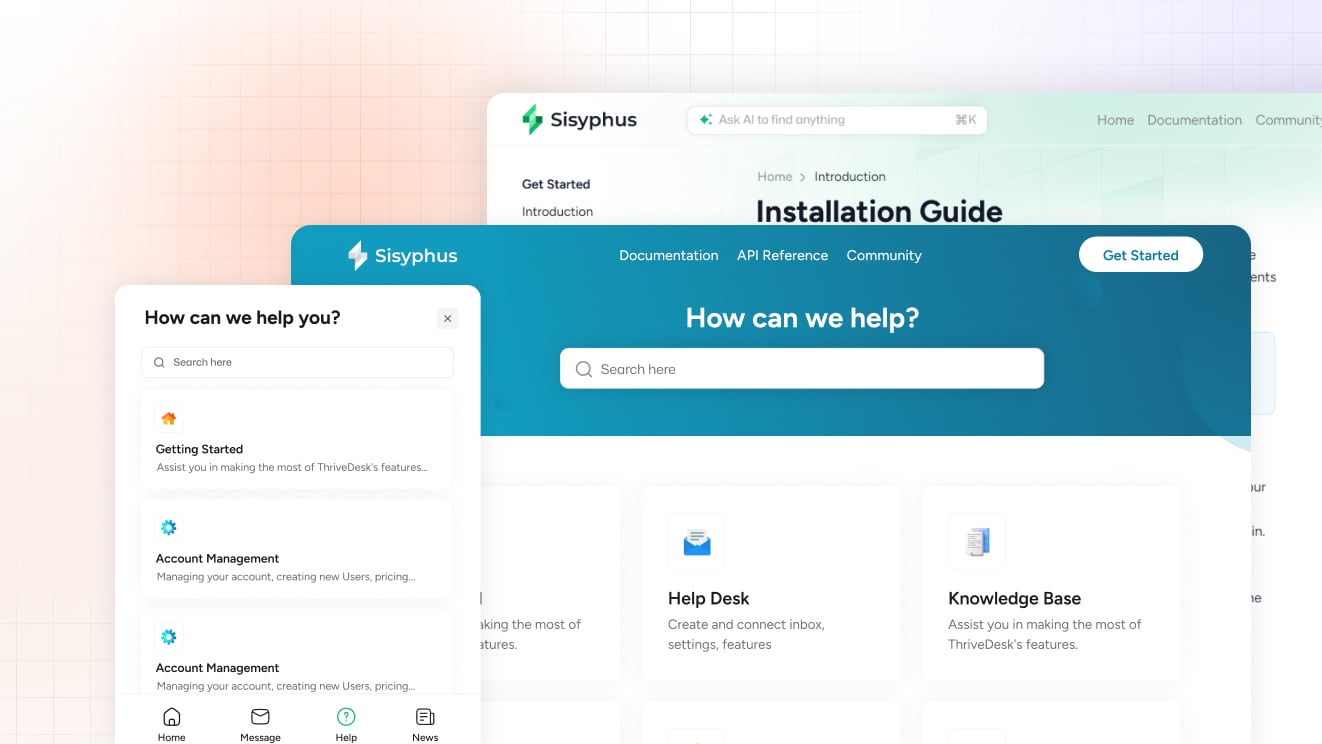
You can also feed it custom Q&A pairs for the edge cases your docs do not cover, and use the AI Playground to test exactly how NEO responds to real questions before it ever talks to a customer. No surprises on launch day.
Where AI Consistently Fails (And Probably Should)
The Low-Resolution Categories
Just as there are ticket types built for AI, there are types built specifically to expose its limitations. The resolution rates here are not a sign of bad AI. They are a sign that the problem requires human judgment, and no one has figured out how to bottle that yet.
- Angry or frustrated customers: 10 to 25 percent resolution. Emotion requires empathy, and AI does not actually feel bad about the situation. Customers can tell.
- Complex technical troubleshooting: 15 to 30 percent resolution. Multi-step diagnosis with environment-specific variables is not a lookup problem. It is detective work.
- Billing disputes and exceptions: 10 to 20 percent resolution. These require judgment calls. The customer has a reason, the policy says something else, and someone has to decide which matters more.
- Feature requests and product feedback: 5 to 15 percent resolution. There is no “answer” to give. The customer wants to be heard, and a bot saying “thank you for your feedback” is technically a response but not really a resolution.
- Multi-issue tickets: 10 to 20 percent resolution. AI handles the first question and glosses over the other two buried in the message. The customer replies again. The cycle continues.
The Hidden Cost of Bad AI Responses
A slow human response is frustrating. A fast wrong AI response is a different kind of problem. When AI confidently gives incorrect information, the customer has now been misled by what they may assume is an official answer. Trust erodes faster when the error comes with confidence attached.
The re-contact rate problem is real and underreported. If AI “resolves” a ticket but the customer comes back because nothing was actually fixed, you have now handled that ticket twice. The second time takes longer because the customer is carrying residual frustration from the first. You have effectively doubled the cost of the interaction.
Agent frustration is a hidden cost too. Cleaning up after bad AI suggestions can take more time than handling a fresh ticket. If your team starts dreading the AI queue, that is a signal worth paying attention to.
The Uncanny Valley of Support AI
When AI sounds too human, customers start expecting human judgment. They will share emotional context, make implicit assumptions, or escalate a simple question into something complex because the tone invited that kind of conversation. Then the AI hits its ceiling and the drop to a robotic policy recitation is jarring.
The more honest approach works better in practice. Label AI responses clearly. Make the handoff to a human feel smooth and natural, not like a failure state.
Customers who know they are talking to a bot and are getting genuinely useful answers will rate the experience better than customers who thought they were talking to a person and felt deceived.
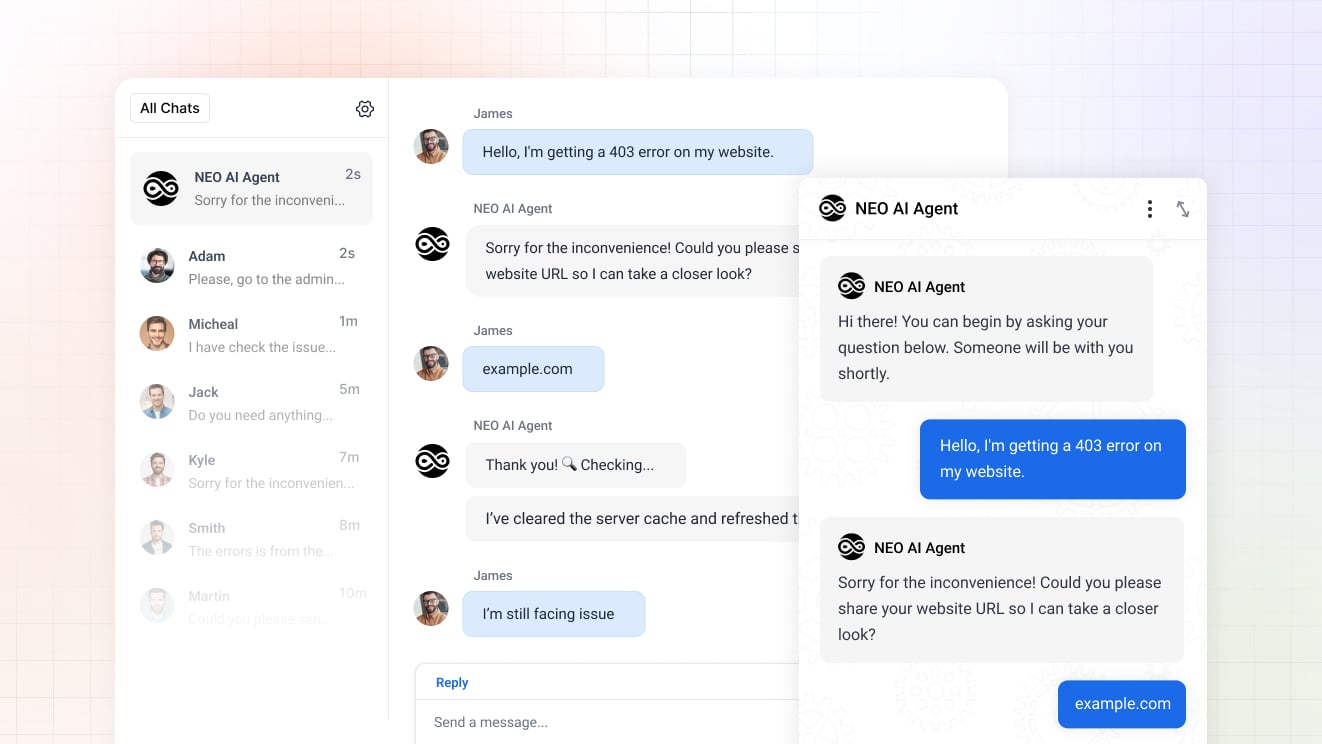
How ThriveDesk handles this: NEO is designed to know its limits. When a conversation gets complex or emotionally charged, it hands off to a human agent without losing the thread of the conversation. The full context, conversation history, and customer details carry over so your agent does not have to ask the customer to start over. The handoff is a feature, not a failure.
How to Calculate Real AI ROI
The True Cost Formula
Vendor ROI calculators tend to be very enthusiastic about their results. Here is a more grounded version. The metric that actually matters is cost per fully resolved ticket, not cost per ticket touched.
- AI cost per resolution: Take your monthly AI tool cost. Divide by the number of tickets that were fully resolved to customer satisfaction, not just closed or deflected. That is your real denominator.
- Human cost per resolution: Take total agent cost including salary, benefits, tools, and overhead. Divide by tickets resolved. Now you have a baseline to compare against.
- The break-even point: AI starts paying for itself when its cost per resolution drops below your human cost per resolution. For most SMBs, this happens somewhere around month three or four with active management.
Hidden Costs to Factor In
The sticker price on the AI tool is the easy part. These are the costs that tend to get underestimated:
- Setup and training time: Getting AI properly configured takes 20 to 40 hours for most teams. Someone’s time has real value. Count it.
- Ongoing maintenance: Five to ten hours per month reviewing AI performance, updating the knowledge base, and refining responses. This does not go away after launch; it just becomes routine.
- Escalation handling cost: Every ticket AI fails on still costs agent time. If AI fails on 60 percent of tickets and those tickets arrive pre-confused by a bad bot response, the human handling time goes up.
- Customer satisfaction impact: If CSAT drops after AI deployment, model the churn cost. Losing customers because support got worse is an ROI number that does not appear in the vendor calculator.
The Realistic ROI Timeline
Months one and two are almost always negative ROI. Setup costs are high, resolution rates are low, and the team is still figuring out what to route to AI versus humans. This is not a warning sign. It is the normal learning curve.
Months three and four are typically break-even for SMBs that are actively managing the system. Resolution rates stabilize, the team has built workflows around the tool, and the maintenance effort becomes predictable.
Month five and beyond is where positive ROI shows up, assuming two things: the knowledge base is being actively maintained, and someone owns the AI performance review. AI is not a set-it-and-forget-it tool. Think of it as a new team member that needs coaching, not a vending machine you plug in and walk away from.
Why the ThriveDesk setup is faster: Because your knowledge base and AI live in the same platform, the training overhead is significantly lower. You are not exporting articles, uploading them to a separate AI tool, and hoping the sync holds.
You write an article in ThriveDesk and NEO already knows it. The AI Playground lets you pressure-test responses before launch, so you compress that month-one learning curve considerably.
Should Your Team Use AI Support? A Decision Framework
You Are Ready for AI If…
There is a set of conditions that consistently predicts successful AI deployment. If you can check these boxes, AI will likely pay off.
- You have a knowledge base with at least 50 well-written, current articles.
- You handle 200 or more tickets per month, with a meaningful chunk of them asking the same handful of questions.
- You have someone who can commit five to ten hours per month to managing AI performance and reviewing edge cases.
- Your CSAT is already above 80 percent. If your support is already struggling, adding AI will accelerate the problems, not solve them.
You Are Not Ready for AI If…
There is an equally clear set of conditions that predicts disappointment. Spending money here will not give you the results the vendor promised.
- Your knowledge base is thin, outdated, or largely nonexistent. AI trained on bad data gives bad answers confidently. That is worse than no AI.
- Most of your tickets are complex or emotionally charged. AI will frustrate your customers without an obvious path to a human who can actually help.
- You do not have the bandwidth to manage it. Unmanaged AI degrades over time as products change and edge cases pile up.
- You are hoping AI will let you skip hiring. It supplements a team, it does not substitute for one. If you are drowning in tickets, you need a person.
The Hybrid Approach Most SMBs Should Actually Use
The teams getting the best results are not the ones who went all-in on AI on day one. They are the ones who deployed it narrowly, proved it out, and expanded deliberately. The practical approach looks like this:
- Start narrow: Pick the five to ten most common, simple, well-documented questions. Route only those to AI. Leave everything else to humans.
- Review weekly for the first two months: AI performance in a new deployment shifts fast. Weekly reviews catch problems before they compound into CSAT damage.
- Expand scope based on evidence: Only broaden what AI handles when resolution rate and satisfaction scores for the current scope are consistently strong.
- Keep humans on everything that matters: Billing disputes, frustrated customers, complex troubleshooting, anything with real stakes. The cost of getting those wrong is higher than whatever you save on AI.
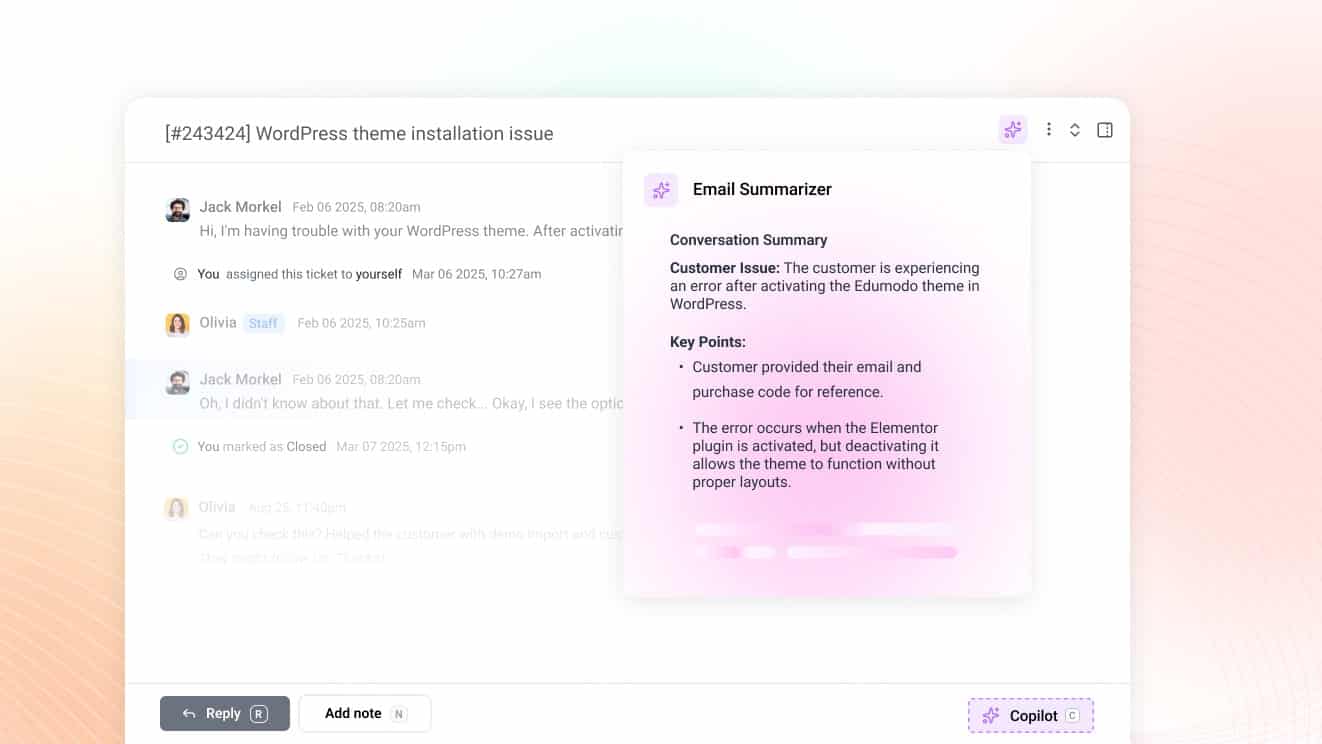
How スライブデスク approaches the hybrid model: NEO works across both live chat and email, so you can deploy it on whichever channel makes the most sense to start. It drafts replies, suggests responses to agents, and handles routine questions autonomously, while keeping humans firmly in charge of anything that requires judgment.
You decide how much autonomy it gets. The transparent resolution tracking built into the dashboard shows you what is actually working so you can expand with confidence rather than guesswork.
Honest Tools Win Long-Term
AI in customer support is a genuine tool. It is not a magic wand, and any vendor telling you otherwise is either uninformed or betting you will not check the math.
The real resolution range for most SMB deployments is 25 to 55 percent. That can mean a meaningful reduction in agent workload if the right tickets are routed to AI. It can also mean a customer satisfaction disaster if it is deployed without the right foundation or the right expectations.
The vendors who are honest about limitations will earn your trust over the long term. The ones selling 80 percent resolution on every homepage will have a lot of explaining to do when month three arrives and the numbers do not cooperate.
The best AI strategy has always been the same: start with a solid knowledge base, deploy narrowly, measure what actually matters, keep humans where human judgment is required, and expand what works. That is less exciting than a homepage stat, but it is how you actually get results.
Try ThriveDesk AI free for 7 days.
We will show you your real resolution rate, no inflated metrics, no surprises. Test NEO in the AI Playground before it talks to a single customer, train it from your existing knowledge base in minutes, and see exactly what it can and cannot handle. thrivedesk.com